What is a POS system and why is it important for your business
Managing a retail outlet requires a range of administrative, managerial, and marketing skills. From ensuring enough inventory to compiling monthly sales reports, these skills are necessary for the smooth functioning of your store.
Choosing an effective point-of-sale (POS) system can go a long way until you make sure that all your business operations will work in unison, and the time and resources spent implementing the system will be worth it because you will benefit from its benefits.
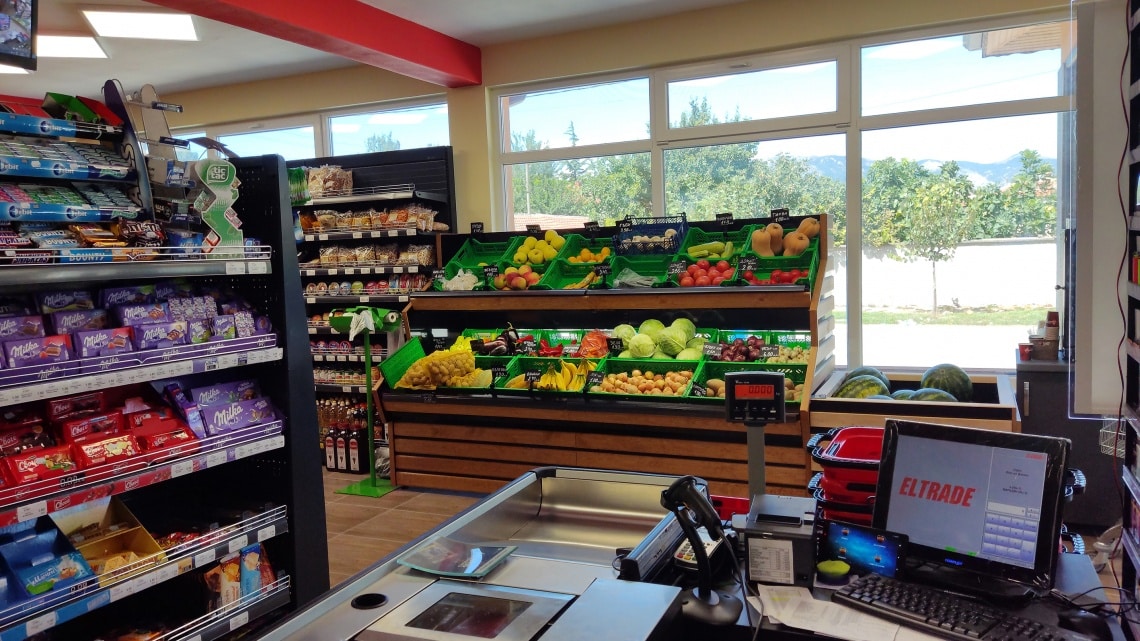
The point of sale or POS is where your customer pays for products or services in the store. Installing the right POS system can eliminate many errors in manual input and sales reporting. Many of the solutions available on the market are similar in function, but also have specific characteristics that stand out in different systems. For example, there are differences in choosing the right system for a clothing store with large volumes of inventory, or for a grocery store that needs to integrate different systems used so far, or for a restaurant that is looking for a solution that guarantees fast and quality service.
A POS system is a key component of your business – the hub where sales, inventory management, and payment processing merge.
According to a survey by consulting firm Software Advice, among US-based retailers, a quarter of surveyed managers planned in 2021 to upgrade an existing or invest in a new POS system, and another 43% prioritized maintaining their POS systems.
As obvious as the benefits of POS systems are, thanks to which some retailers increase their sales by up to 200%, there are also businesses that use some combination of manual methods, accounting software, and spreadsheets to process transactions and record sales.
Why there are companies that have not yet taken a step towards POS
Implementing a new technology – especially one that centralizes business processes – may seem like a daunting task for some managers. But retailers should think carefully about the negative consequences of not having a POS system. They risk slowing down their operations and missing out on critical data that could help them grow their business faster and more successfully.
Understanding what a POS system is – its software and hardware components, as well as its ability to optimize processes – will allow companies to make an informed decision when choosing a system suitable for the specifics of their business.
Software components of the POS system
Each POS system consists of software and hardware components that make day-to-day business operations easier and faster. It’s important to understand what POS software options are available and what each one has to offer. Here are some differences.
A small store owner with one checkout workplace can be a good candidate for a lightweight program that makes the sales process as easy as possible. Choosing a basic system, he can work with an unlimited number of items, track deliveries, keep track of inventory, create various types of allowances, discounts, promotions, control the work of personnel.
On the other hand, a chain of restaurants with multiple locations and locations would probably benefit more from a POS system with centralized data processing, inventory management, customer loyalty program, calculation of prices, allowances, discounts and promotions, creation of recipes, optimization of bar and kitchen orders, minimal delay in customer service, etc. devices connected to them (printers, client card readers, etc.). The rest of the restaurant’s needs will be served by the back office, which may include a server and a few additional jobs.
When deciding which system to choose, keep in mind that easy integration and staff training to operate the system are imperative.
Flexibility is key. If you’re already using apps that are important to your business, make sure that the POS system can integrate with them seamlessly so you can continue to use them. For example, a restaurant can use an online ordering and delivery app, which is good to integrate with the restaurant’s new POS system to allow customers to pay directly through the app.
Hardware components of the POS system
The basic elements of a POS system are a computer or POS terminal with built-in sales management software and a fiscal device. Additional elements of the system can be:
Displays (for the operator and for the customer)
Touchscreen
Keyboard
Barcode Scanner
Cash drawer
Barcode Printer
Electronic scale
POS printer for bar or kitchen
Bar or kitchen monitor
Card reader
Data collection terminal
What elements your cash system will include depends entirely on the workload of your retail outlet and the preferred way of working.
Key Features of a POS System: What to Look for When Buying
Many activities in retail stores can be tedious and resource draining. With the right POS system, merchants have the opportunity to facilitate important day-to-day business operations. Modern POS solutions improve a trader’s chances of success by providing them with tools to streamline business processes.
What capabilities does your POS system necessarily have?
To monitor all transactions in the store – deliveries, movement between warehouses, scraps, sales, etc.
To provide a flexible pricing policy with a variety of promotions, allowances, discounts, games, raffles.
To automate the delivery process, receive timely information about the minimum and maximum quantities of the relevant items.
To guarantee a minimum of marriage.
To give information about the winning and losing parts of the business.
To create and maintain an information register of customers.
What other functionalities is recommended for your POS system to have?
To provide a wide range of reports for the needs of the management of the commercial site.
To offer an option for centralized management – from one central office to manage many sites, change prices, make requests for deliveries.
To allow connection to external programs and solutions.
Store the data on a cloud server.
To develop a loyalty program.
If you are choosing a POS system for the first time, make a list of the features you want it to have. Then, start searching and make sure that suppliers cover the key points important to your business while offering a secure, easy-to-use, and maintainable modern solution.
Eltrade offers excellent solutions for managing sales in stores and restaurants. Our consultants are ready to help you choose the right system for your business.